EngageNet features

Everything your business needs to keep moving.

Explore EngageNet CRM features for enquiries, follow-ups, quotations, invoices, purchases, WhatsApp, finance and team reporting.

Request a Demo

Explore every part of your business

From the first enquiry to your business reports.

Explore the tools available across EngageNet. Your subscription, permissions and company configuration determine which modules you can use.

01 / EngageNet features

Contacts & customer records

Keep the people and companies behind each sale together.

  • Maintain customer names, company details, phone numbers and email addresses.
  • Keep billing and shipping addresses ready for sales documents.
  • Access related quotations, orders and invoices according to your permissions.
  • Manage vendors and transport contacts alongside customer records.

02 / EngageNet features

Enquiries & lead management

Give every enquiry a clear owner and a place in your sales process.

  • Create leads with customer requirements, products and lead sources.
  • Assign enquiries to the salesperson responsible for the opportunity.
  • Use lead stages and follow-up lists to review what needs attention.
  • Filter lead records to focus on the customers and opportunities you manage.

03 / EngageNet features

Follow-ups & conversation history

Know what was discussed and what should happen next.

  • Record follow-up notes against an enquiry.
  • Set the next follow-up date and update the lead stage.
  • Use separate views for leads without a follow-up and other follow-up categories.
  • Review earlier notes before the next customer conversation.

04 / EngageNet features

Quotations

Prepare a clear offer using your company and product details.

  • Add products, quantities, prices, discounts and applicable taxes.
  • Maintain customer details, terms and quotation status.
  • Generate quotation documents for printing or downloading.
  • Convert confirmed quotations into orders using the existing sales workflow.

05 / EngageNet features

Sales orders & dispatch

Keep confirmed business connected to the original enquiry.

  • Maintain order details and the products agreed with the customer.
  • Review order statuses as work progresses.
  • Keep billing, shipping and transport information with the sale.
  • Continue from confirmed business into dispatch and invoicing workflows.

06 / EngageNet features

Sales invoices & collections

Connect the invoice with the payment that follows.

  • Prepare itemized invoices with your business and customer details.
  • Generate printable and downloadable invoice documents.
  • Record received payments and review outstanding invoice balances.
  • Use assigned ownership so salespeople see the financial records they are authorized to handle.

07 / EngageNet features

Products, categories & movement history

Keep product information consistent across sales and purchases.

  • Maintain a shared product catalogue for your company.
  • Organize products into categories and use them in business documents.
  • Review recorded product movements in the product ledger.
  • The movement ledger is a document-based record; it does not represent a full physical-inventory or manufacturing system.

08 / EngageNet features

Vendors, purchase orders & bills

Bring supplier-side work into the same business process.

  • Maintain vendor records and their contact details.
  • Create purchase orders and record bills against supplier purchases.
  • Track purchase document statuses, attachments and payments.
  • Record supplier returns and generate purchase documents.

09 / EngageNet features

WhatsApp chats & messaging

Keep connected customer conversations close to your sales work.

  • Connect and manage supported WhatsApp devices or accounts.
  • Review available chats and message history through the connected provider.
  • Send individual messages and use the existing bulk-message screens.
  • Messaging requires an active company connection and remains subject to provider rules, configuration and plan allowances.

10 / EngageNet features

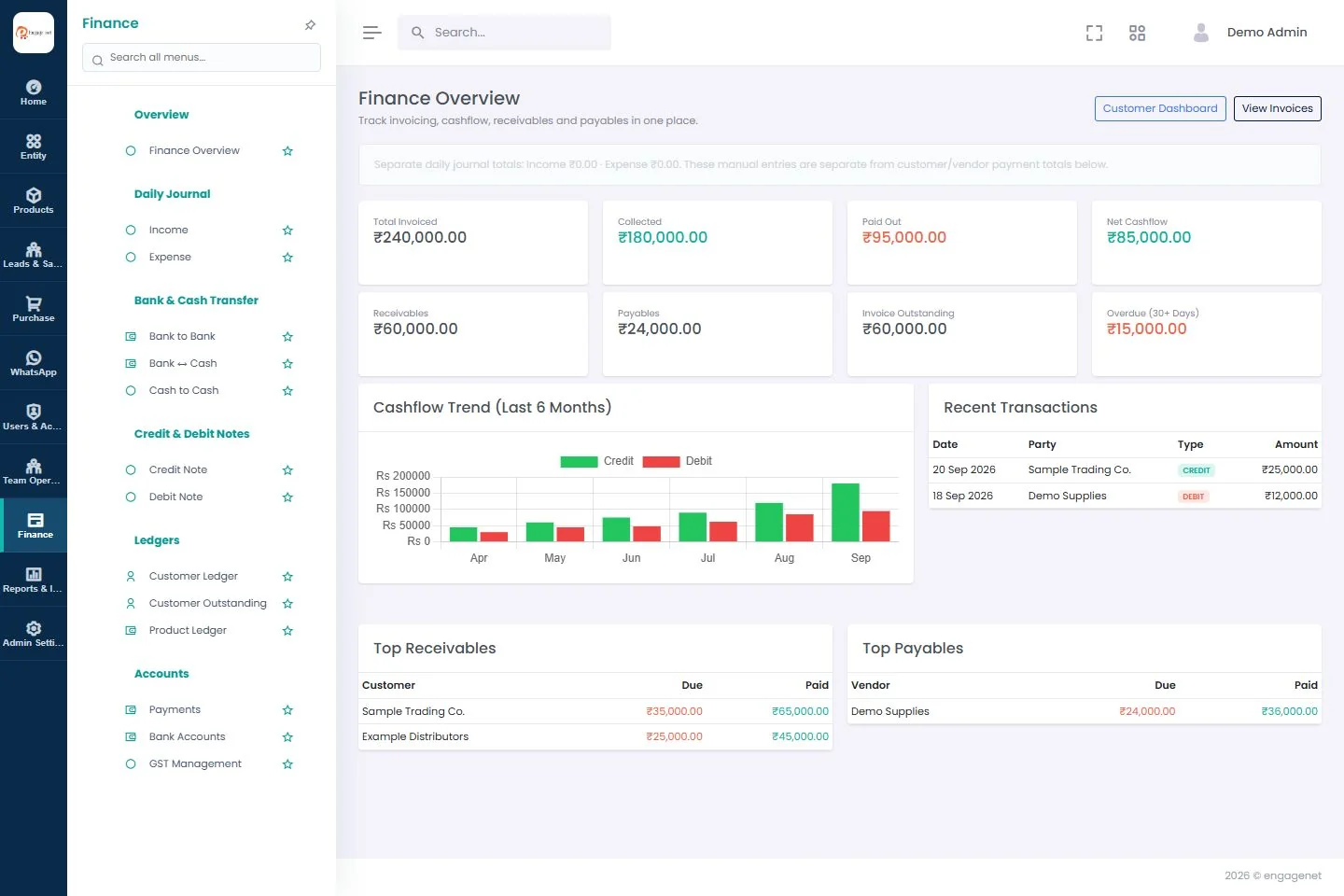
Finance, payments & ledgers

See collections, supplier payments and outstanding amounts together.

  • Review invoiced, collected, paid, receivable and payable totals.
  • Record customer and vendor payments and review customer ledgers.
  • Maintain daily income and expense entries and bank accounts.
  • Record bank-to-bank, bank-to-cash and cash-to-cash transfers.

11 / EngageNet features

Credit & debit notes

Record financial adjustments with a traceable document.

  • Prepare credit and debit notes with the relevant party and details.
  • Review drafts before finalizing a note.
  • Record settlements and authorized reversals.
  • Print or download note documents for your records.

12 / EngageNet features

Sales & business reports

Turn recorded activity into a clearer view of the business.

  • Review total sales, customer sales and outstanding amounts.
  • Compare new and returning customers and product sales.
  • Review sales analytics and salesperson performance.
  • Use income-versus-expense and login reports where your permissions allow.

13 / EngageNet features

Team access & ownership

Give people access that matches their responsibilities.

  • Company admins can see records across their own company.
  • Salespeople see assigned records subject to their role permissions.
  • Control access to business modules through roles and permissions.
  • Keep separate companies in their own workspaces.

14 / EngageNet features

Attendance, leave & payroll records

Support everyday team administration alongside sales work.

  • Maintain employee records, departments and designations.
  • Record attendance and manage leave requests and leave types.
  • Configure working hours, holidays and leave rules.
  • Maintain payroll records, payment history and sales targets where enabled.

15 / EngageNet features

Lead-source connections

Bring enquiries from configured business channels into the CRM.

  • Configure supported Facebook lead connections for your company.
  • Use Google Sheets and IndiaMart import connections where configured.
  • Keep imported enquiries in the lead-management workflow.
  • Each connection needs the appropriate account access and company setup; connections are not automatically active.

Before you choose

A few practical answers.

Is EngageNet suitable for trading and distribution?

Yes. The sales, vendor, purchase, invoice and collection workflows are designed to support trading and distribution businesses. Request a demo to walk through your process.

Can calling and field-sales teams use it?

Teams can manage assigned enquiries, record customer conversations and schedule follow-ups. Request a demo using your team’s actual calling or field-sales process.

Can every salesperson see all company invoices?

No. Company admins have company-wide visibility. Salespeople see assigned records according to their permissions, including the ownership rules for quotations and invoices.

Are all modules included in every subscription?

Check the current pricing page for each plan’s enabled modules and limits. Some connections require separate configuration and provider charges may apply.

Do customers need to log in?

No. EngageNet is a workspace for your staff. Customers do not need a customer portal to receive your business documents or messages.

Can I see the software before signing up?

Yes. Request a demo and our team will contact you to arrange a walkthrough. You can also check the current free-trial availability on the signup page.
Compare plans and limits
A connected view of your business · demo workspace
EngageNet Finance screen with demo records

See how EngageNet fits your business.

Walk through your sales process with our team, from the first enquiry to the next collection.